I purchased an iPhone 3G shortly after it was released. It was my first smart phone and my experience has been something of a love hate relationship. See What I like about my iPhone 3G and What I hate about my iPhone 3G. While there is nothing wrong with my phone, it has survived undamaged, I have the urge to upgrade. I have a problem with gadgets and need to move onto something new.
My current collection of mobile gadgets includes my iPhone 3G, my Zune 80, and an iPod Touch that gets no use. I use my Zune for podcasts, but would be willing to move to another device if it was better than what I currently use. I really should sell my iPod Touch or give it to someone as a present. Just to throw this into the mix, I don't have any plans to buy an iPad but a good Android table would be hard to resist.
The Nexus One phone purchased unlocked from Google that works on AT&T costs $529. That is a lot of money, but since it does not come with a contract I am willing to pay that price. For how much I use my phone, cost is not a factor.
It really comes down to the decision of what phone to buy. Right now I am thinking about clicking the checkout button on the Nexus One and jumping ship over to the Android platform. This is partially motivated by my desire to develop mobile applications.
Is the Nexus One the right choice for me? If I don't get a good argument against the Nexus One I'll hand over the cash.
Tuesday, April 13, 2010
Abandoning my iPhone for Android?
Monday, August 4, 2008
What I like about my iPhone 3G
This is a fairly obvious follow up to my blog post from yesterday, What I hate about my iPhone 3G. The main reason I wanted an iPhone was to have access to email and the Internet while I’m away from my computer. My goal was to be able to check my Gmail account and Google Reader without booting up my computer in the morning. I didn’t plan to and haven’t used my iPhone as an MP3 player. While I’ll still probably list some of the negatives in this post, it is more focused on the positive. (Just as a side note, when taking screenshots for this blog post my iPhone crashed and rebooted. The reboots are really frustrating!)
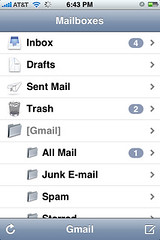
This is probably my favorite part of the iPhone, but probably not the best feature of the iPhone. While I don’t have any experience with other phones, I can say for my needs, the iPhone functions just fine. Before, I didn’t have mobile access to my email, now I do. That boils down the basic reason why I like the email on the iPhone.
I only use my Gmail account (the only other email account I use is my work email), but I find that I use a combination of the built in application to read and respond to emails and the Gmail mobile interface in Safari to manage and archive emails. This provides the best solution giving me email alerts every 15 minutes through the built in application but an enhanced interface when I need it via the web.
Using Gmail and IMAP I have a single place to manage all of my email. Any change made on the web interface, my iPhone, or Outlook all are synchronized making it easy to move between the various interfaces.
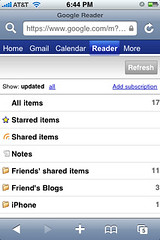
Google Reader
I must admit that it is a disappointment there is no built in RSS reader provided by Apple. While there are some RSS readers available in the application store, with even a few of them being free. Even if there was an RSS application, I would likely not use it because of my addiction to Google Reader.
I’ve been extremely loyal to Google Reader since I started using it and have spent an extensive amount of time customizing all of my RSS feeds. The Google interface in the web browser provides a very fluid interface. It manages to function about the same quality as many of the dedicated applications. The Google Reader interface relies entirely on AJAX making it very responsive, but quirky at times.
I find myself taking the few free minutes I have throughout the day reading the news that appears in my Google Reader. This really saves time in the long run because I can read a few stories at a time throughout the day and not just in one long sitting.
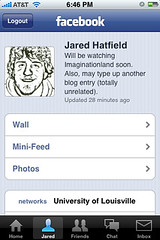
Facebook Application
When this application was first released many people complained about it not being very stable and was basically unusable. However, a new version was released by the time I even purchased my iPhone so I’ve had an overwhelmingly positive experience with it. I have found that it has caused my to stat using Facebook a little more.
While there are some glaring features missing, like the ability to add new friends and accept friend requests, it covers the basic functionality required to use Facebook. As an added bonus, in playing with the built in chat client, it works perfectly with the only drawback being it only can get alerts when the application is open. The best feature is the picture integration. I have disabled Facebook mobile because it no longer is necessary. I receive alerts via email and can access and respond to messages and wall posts via the interface.
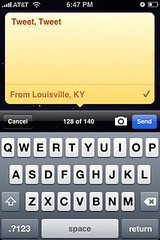
Twitter: Twinkle
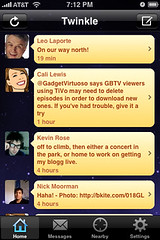
I would be thrilled to move to some other Twitter client, but nothing is quite as elegant. The built in location information is nice, but it is tied to Twinkle and not Twitter. Also, it crashes at least once every day. The interface displaying the tweets is far better than the other ones I’ve played with. However, I will probably move away from this application if something else presents itself.
While the Facebook application (along with email alerts) have caused me to deactivate Facebook text messages, I still have selected tweets sent to me as text messages. Again, this could be solved with background process. However, I really hope this problem is solved when Apple releases their push ability for developers.
YBmobile & Google
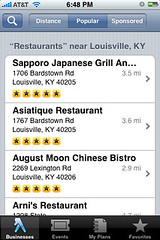
I’ve tried a wide variety of applications to identify restaurants and other business near my current location. While I haven’t found one that stands out, my favorite is YBmobile. This application can perform a simple location based search. The results always include an address and phone number and sometimes a web address and some other useful information.
My close second place is Google and their combination of the creatively named Google application and the built in Google Maps application. I’ve had mixed results with this because it doesn’t present the information perfectly. It produces useful results, but it doesn’t have the best interface to go through them. However, when getting directions to a place via YBmobile it automatically opens Google Maps so I end up using Google Maps in the end no matter what. On a random side rant, I still need to use my TomTom to get actual turn by turn directions when navigating to anywhere.
Shazam
Shazam and midomi are amazing applications that do almost the exact same thing. When just listening to a song that you want to identify, Shazam is by far the better of the two application. My success rate with Shazam is almost perfect. Midomi seems to miss even obvious songs when Shazam has no problem. However, midomi provides additional functionality by allowing you to say the name of a song or hum or sing a song.
Shazam’s interface is very simple, but midomi provides far more functionality. The best feature of tagging a song is the ability to play the YouTube video. While they both allow this, I feel that midomi has a little advantage in this category.
This category of applications is still in its infancy and I am excited to see how these evolve.
Conclusion
So far I’ve been satisfied with my iPhone, but I would have not been able to stand the first generation iPhone. The application store, GPS, and high speed connection (3G) makes the device a replacement for a laptop for quick trips to the Internet. While I’ve been a little heavy on the iPhone blogging the past two days, I still haven’t mentioned some of the other applications (mainly games) that I have used on my iPhone.
Overall having an iPhone has changed my Internet habits and having access to search no matter where I am will prove useful in situations I’ve yet to be in. Overall, there are a large number of benefits to the iPhone and I have no regrets, yet, in my purchasing decision. While the iPhone was meant to be a phone with an iPod built in, I have yet to use any of the iPod functionality. For me the iPhone serves as a communication device that has an amazing portable web browsing experience.
Sunday, August 3, 2008
What I hate about my iPhone 3G
iPhone 3G
First things first, there are many things I like about my newest gadget, however there are definitely some things that are frustrating. First I need to make a list of confessions before I begin talking about the phone. I’ve never owned an Apple product, this includes the first generation iPhone. That doesn’t mean I don’t like my decision to go over to the dark side (AKA: Apple). However, I did own a Motorola SLVR, my previous phone, so I have experience with iTunes. Somewhat ironically, I am a happy Zune 80 owner and still use it every day, mostly for podcasts. So, I’ll let the seemingly endless rant of things that I don’t like about my iPhone:
The Battery
It is absolutely necessary to charge the iPhone 3G every day. Sometimes the battery doesn’t even last an entire day. This is annoying to say the least. I would charge my SLVR every 2-3 days and almost never have problems with my battery. One of the annoying parts of the iPhone 3G is the length of the battery is dramatically affected by having the location service enabled. This is somewhat annoying because it isn’t exactly quick to turn it on and off especially because location aware applications will start prompting if it is turned off. Overall, I can live with the battery right now. I’m mainly worried what the battery will be like in a year after it starts to decline.
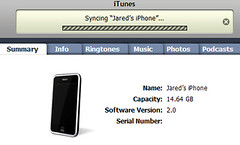
Syncing
I think Apple does a terrible job with syncing. I always have. I’ve never had good experiences with iTunes. The iPhone 3G is no exception. This can be divided into several sub-components that I have problems with.
Syncing: Contacts
This really isn’t a negative on the iPhone as much as it is with Google. The contacts syncing between the iPhone and my Outlook 2007 contacts works perfectly. An added bonus is that I now get pictures in my Outlook contacts. The problem is I never use my Outlook contacts for anything. I’m almost always using Gmail and the lack of sync between Outlook and Google Contacts really is causing a split among my set of contacts. I am also concerned when syncing between multiple services causing a complex relationship that overwrites data or doesn’t correctly propagate changes.
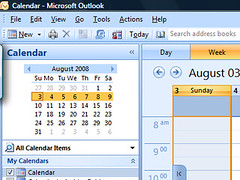
Syncing: Calendar
I use Outlook 2007 for my calendar and my tasks. I love the interface too much to use anything else. I do a one way synchronization of my calendar to Google Calendar just to have it accessible on the web, but it is a view only interface. This also allows me to share it with people if I give them access. The biggest complaint with the calendar is that it is a terrible interface and doesn’t have support for tasks. Again, this is a complicated relationship involving Google and Apple. Right now it looks like Outlook is going to remain my center point of data. However, the benefit here is now I don’t need to boot up my computer to get my calendar but I still need my computer for my tasks which will become a pain once classes start back up.
Syncing: Podcasts & Music
I’ll be fair and say I didn’t give iTunes a chance. My past experiences with iTunes and podcasts were not very positive. I would end up with a corrupted library and have to spend time to add all of my podcasts and delete all of the orphaned files. I don’t listen to much music. I have all of my music currently on my Zune and I haven’t even put a single song on my iPhone. While the interface for music on the iPhone is, I assume excellent, the interface for playing podcasts isn’t quite what I would want to use. Since the focus here is complaining about syncing, it just isn’t feasible for me to put up with syncing podcasts every day using the iPhone. To make a completely unfair comparison, I’m able to quickly download and sync new episodes of podcasts to my Zune making it an excellent solution to always having fresh content. However, should the iPhone become a stand alone podcatcher, it would be very hard to compete with.
Syncing: Backing Up… (Come back in 10 minutes)
This is probably the worst part about the iPhone syncing process. Every time you connect it to sync it backs the device up. This has resulted in me not wanting to sync very often. While it is possible to disable this backup functionality, I won’t because the backup is valuable should I need to restore the device. Basically, this process takes FOREVER! In general the time it takes to sync the iPhone (contacts, calendar, photos, and other content) takes several minutes without the added overhead of backing up the entire device. Even my TomTom can manage to back itself up quickly. In conclusion, while there are no real problems with usability and the iPhone, there is a lot to be desired in the realm of syncing.
Crashes and Reboots
This is the most annoying part of having an iPhone be your actual phone. I probably haven’t gone a day without it rebooting itself once and occasionally I’ll need to reboot it myself to get some functionality back. I’ve noticed that most of the problems tend to center around the location based applications, specifically Twinkle. While Twinkle is my favorite way to Twitter, I know there is a 1/4 chance when I click the application that it will reboot my phone without warning. They even released an update saying it would fix the crashes, it didn’t make much of a difference for me.
The stability problems have never been a problem when only using the built in functionality. The core functionality is stable and has always worked. I’ve actually found a way to get out of a frozen interface is to call my phone forcing it to exit the application it is currently running.
Conclusion
In conclusion, there are a few major annoyances I have with the iPhone. I’m looking forward to version 2.1 which is rumored to be released sometime in September. While the battery, syncing, and crashes have been annoying, it will still be my phone for the foreseeable future.
Tuesday, July 29, 2008
An iPhone as my Phone

I was heavily leaning towards purchasing a Blackberry for a long time. However, I sold my soul to Apple and now have an iPhone what is now about a weeks. I have held off on posting my impressions so that I could have some experience with the product. I have even had the opportunity to use it on the Edge network when I went on vacation with my Family.
First off, I went for the iPhone for the email and web browsing experience. While Blackberry has the iPhone beat hands down on the email experience, I am not a heavy email user. While I am probably above average, I consume far more email than I type. For business users composing emails the Blackberry is a superior device in typing email. The iPhone really shines from a web browsing experience. While it still lacks the support of Flash, which makes many websites unusable, it is a wonderful browsing experience. The ability to tap the screen to zoom into elements makes it very easy to navigate websites not designed for the portable environment.
However, my experience hasn't been all positive. First off, the sync is almost unusable. The backup process takes several minutes. I can't help but compare my experience with my Zune to my iPhone. While there isn't much of a feature overlap, I can not see myself abandoning the Zune. I use my Zune almost exclusively as a podcatcher. First off, the Zune interface is far easier to use than iTunes for watching content on the computer. I've used both for months and this is just my hard learned opinion. Additionally, the amount of time it takes to sync the Zune is very short compared to the iPhone. This means I can get fresh podcasts onto my device quickly.
As an example, I attempted to add a podcast to my iPhone just for the experience of using it, but I was having trouble forcing the new content to sync to the iPhone even though the settings were correctly configured. It ended up taking a reboot and then a few more attempts connecting and disconnecting the cord before it would transfer. I have never had trouble syncing content to my Zune. As another example I edited a video for work and wanted to put it on my iPhone, after struggling to transfer it into iTunes for several minutes I simply copied it to my Videos folder on the computer that syncs my Zune. Before I could even pull up the Zune software it was already copied to the portable device. Even though it could be argued that I wasn't using iTunes correctly or something else was wrong, the experience was flawless for the Zune and frustrating for the iPhone. To boil it down, Microsoft has Apple defeated in the area of syncing.
Moving on to the other major part of the iPhone: Applications! I will admit this was one of the things that set the 3G iPhone apart from the first generation iPhone. Having the ability to access a large collection of applications, with many of them free is a big value added. This was also another check in the Apple category over purchasing a RIM device. Buying into the platform that has a lot of excitement and momentum behind it played heavily in my decision. This is amplified by the fact that many of the Web 2.0 type sites I use and enjoy have jumped on the iPhone bandwagon.
It goes without saying that the battery life of the iPhone 3G isn't very stellar. It lasts about a day. I will admit that it does take some effort to charge every day where with my old SLVR required me to charge every 2-3 days based on how much I used it. I've learned the iPhone's battery life is very dependent on use and I haven't fallen down far past the new gadget phase.
The iPhone has a GPS but it can't even compare to a TomTom or other brand GPS device. I have a very low end TomTom and use it when I'm driving. It automatically corrects, gives turn by turn directions, and identifies points of interest nearby very quickly. The iPhone is simply a location aware device. While future updates may more the iPhone closer to a GPS device it still will be hard pressed to replace dedicated GPS devices just as it currently found a way to replace my GPS. In the end I'm not carrying any more or any fewer gadgets with me.
Another problem is the fact that some applications crash, far too often (AKA: ever). It has only been third part applications that have triggered the long reboots. Along the same lines, it takes forever for the phone to reboot! I will probably elaborate in more detail about my experience in another post. So far the phone hasn't locked up without automatically rebooting. Additionally, it appears that the crashes revolve around applications that use the GPS functionality. Even though I've had the phone for about a week, I still only have my first impressions. I would like to list out some of the applications I use but I'm still developing habits.
Right now, my biggest take away is that I will probably not be using my iPhone to listen to my podcasts. The Zune is just a better experience for me. The iPhone is amazing at email and web browsing, and that was the main reason I purchased one.


