Friday, July 6, 2007

Office 2007

I'm now running Office 2007 courtesy of Speed School.  I have been running OneNote 2007 for a while, but this is my first experience with the ribbon.

So far, I am still really lost in the new interface, but I can see the potential.  It will probably be really similar to my Vista experience of just pure confusion at the new interface, but it becomes familiar rather quickly.

The main problem with Office 2007 will probably be the backwards compatibility.  I don't use Office all that much except for OneNote which I use to take my notes for class.  I also use Word for witting papers and the such and Excel for tracking all of my grades.

The basic function of the applications are the same, but the interface is completely different.  Also, 2007 seems to fit in nicely with Vistas more stylish design.  I'm a little nervous of not knowing how to do some important things, especially in Outlook which I use for tasks and a calendar.

I'm also curious about the inking function, but I haven't even found out how to use it yet.

If I get more time I'll blog more about Office, but overall it is worth the upgrade.  However, what do I know, I upgraded for free.
Acrobat Reader Under Vista Install Trouble

I was having a heck of a time installing Adobe Acrobat Reader 8 under Vista.  I finally figured out how to get it to install.  The problem was that the installer would simply hang and not progress.  There would be nothing displayed on the screen and the setup process would need to be killed with the task manager.

The solution to the install problem is to simply run the setup in XP SP2 compatibility mode.  After that option is set under the properties the install progressed with no problems.

Thursday, July 5, 2007

I found a use for my XP Virtual PC

I found a use for my XP install under Virtual PC 2007.  I needed to run Solid Edge V18 to finish my homework for EG 214 and it doesn't play nicely with Vista.  Therefore, I decided to install it under XP.  Granted, it was a little sluggish running in a virtualized environment.  I did remember to make a backup of my XP image, so after I'm finished with this class and will never need to use Solid Edge again, I'll just revert back to my previous version of XP and it will be as good as new. (A new version that includes over 100 updates already installed.)

Vista Reinstall

I gave in, yesterday I finished reinstalling Windows Vista.  I didn't have my new copy of Ultimate so I just reinstalled Business and I'll upgrade to Ultimate when I get my copy.

So far I've been happy with the reinstall because I no longer get bluescreens and I can install drivers without crazy problems (see my previous post).

Vista problems I don't want to deal with

I plan on reinstalling Vista really soon because of some of the problems it is giving me.  First off, and probably most annoying, any Adobe product will not function properly including Acrobat Reader.  It is quite annoying when I have to open a PDF document because I can only get it to work following a very specific process.

Next on the annoying list is my driver problems.  Mainly, Vista will not auto locate any of the drivers.  Basically, what it does is prompt for a location of where to find the driver every time, even if it has the driver.  This was the case for my digital camera, which made things very confusing.  Also, ever single flash drive I put into my computer takes over 2 minutes to install, where on other Vista computers they are functional in a few seconds.

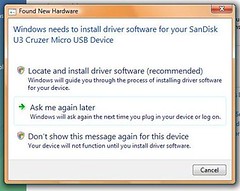
Here is what happens when I install a new device.

First it brings me to this screen like it doesn't know what driver to use.  It should just start installing the device automatically.  At this step I click the "Locate and install..."

Driver Install Error Problem #1

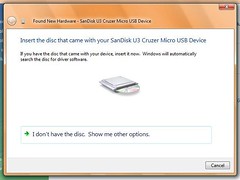
Next, I am prompted to have a disk, which I don't have.  Actually, there is no other driver I can use in this case except the built in driver provided by Microsoft.

Driver Install Error Problem #2

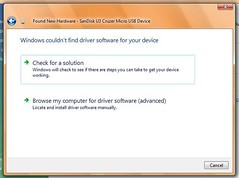
Then, I'm given two choices.  The first gives no help because Vista assumes that the driver for the device is already on your computer.

Driver Install Error Problem #3

From this screen, if I check for a solution it doesn't locate the driver because it should be on the computer.  The only way to get it to work is to browse and set the location to C:\Windows\

To compound the problem, the above steps are typically required to be followed multiple times because most devices use multiple drivers.

Powered By Blogger